
Lenovo Legion 5a (Gen 11) (2026) Gaming Laptop Review – What You Expect From A Great Mid-Ranger

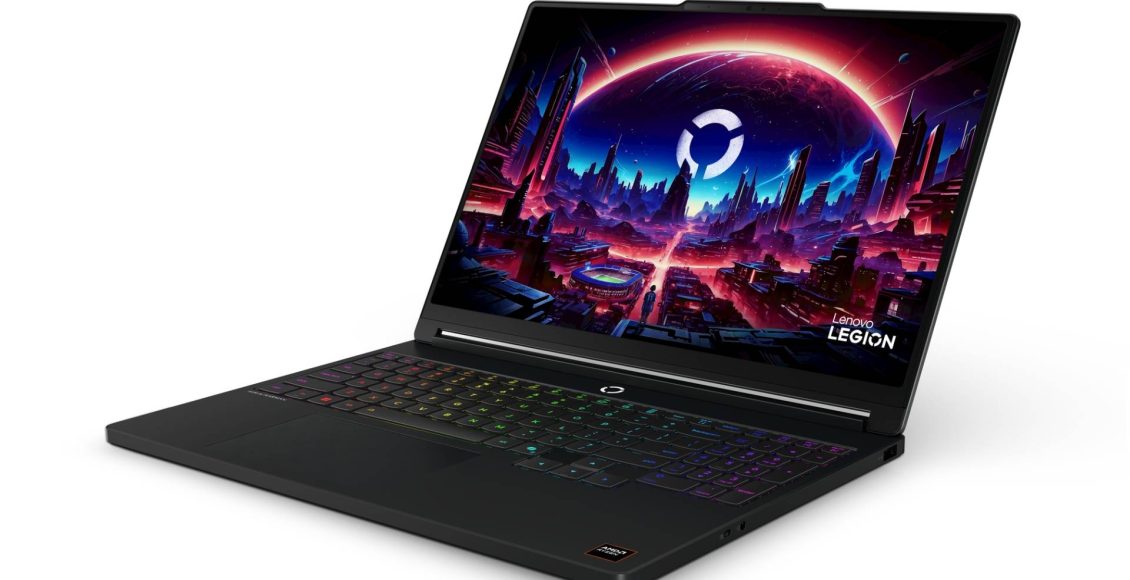
Lenovo has been doing these Legion gaming laptops for at least 11 years now. They’re proud of this fact as these days, each Legion laptop comes with what generation it comes from in its official name. We’re at Generation 11 now.
But what more can Lenovo add? The answer is refinement to its premium gaming laptop line that adheres to the “business at the front, party at the back” philosophy.
This year’s Lenovo Legion 5a evolves the sleeper gaming laptop to be more elegant while still able to pack that raw compute power for running games and other heavy-load applications.

Review Unit Specs
For reference, the review unit of the Lenovo Legion 5a (Gen 11) (2026) is based on the Lenovo Legion 15AGP11 (model 83Q6005XMJ) in Glacier White, with the following specs:
- CPU: AMD Ryzen AI 7 450
- GPU: Nvidia GeForce RTX 5060 8GB VRAM 115W
- RAM: 16GB DDR5
- Storage: 512GB M.2 2242 SSD
- Display: 15.3-inch 2560×1600 16:10 165Hz OLED 1000 nits HDR 100% DCI-P3

Hardware
Gaming laptops are getting ridiculous in prices these days, so are PCs in general and gaming consoles at that, thanks to current AI boom. So with the increased in price, one would expect that we’re just overpaying for chips. Thankfully, Lenovo delivered in this aspect, as always, with another quality-looking build of a laptop chassis. The review unit we have here is finished with this surface that’s nice to touch, that invites you to glide your fingers on it more to feel how fine the slightly grippy chassis is. It feels like a premium laptop you paid RM8,000 for.
There’s been a resurgence of ports in gaming laptop as of late, as the Legion 5a (2026) is has two USB-C ports, 3 USB-A ports, an HDMI port and get this, an Ethernet port for wired connections. There’s no DisplayPort, as Lenovo expects you to use USB-C monitors if you need another extra monitor on top of the HDMI output. No microSD card slot, though, which is gaining in practicality since portable gaming PCs use them as well. Would be nice to supplement the meagre base SSD size with something, but an external SSD will have to do it looks like.


It’s interesting to see the evolution of gaming laptop cooling over the years. And it looks like having two side intake ports is not in vogue anymore, as the Legion 5a here simply has air intakes from the bottom panel, and air goes out from the two vents at the back. A bunch of ports, including the proprietary output outlet, sits in the middle in-between the three vents, though the rubber grip on the bottom is tall enough to ensure wires coming out of those ports won’t block the vents, while ensuring there’s clearance down there for fresh air to get sucked in. The result is a cleaner look on the sides, but ports are now scattered around the machine.
Speaking of the looks, the Gen 11 chassis of Lenovo Legion laptops are an amalgamation of some design notes from Gen 9 and Gen 10, the two of them being very disparate in design. Gen 11 Legions brings back that extruded facade for the vents, as well and the hinge housing design from Gen 9, while keeping the Gen 10’s centered Legion logo, protruded top lid and port layouts. Though as mentioned before, Gen 11 has added more ports at the back.

It’s a little annoying having some ports at the back, and even worse, there’s no labeling from the top, so you’re expected to learn what all the four ports are by heart or have the laptop repositioned to see the ports better when you’re plugging in something.
Not that it’s hard to lift the whole slab, plug it correctly and put it back in position. But one, I’m just used to have the laptop stay prone while I plug my cables in, but also Lenovo used to have labelled ports on top of the back ports, with lighting no less for when they are plugged in Legions from 2019! Shout out to the Lenovo Legion Y740.

The keyboard is a surprise if you haven’t been using a Lenovo Legion laptop for a while. The keystrokes has a nice sense to it, a good chuck and thump but not clicky-clacky. Typing feels satisfying. Despite being a built-in keyboard that has to be built in tight size constraints, the keyboard doesn’t feel like an afterthought, there’s some proper good feel to it. Having the “O” key labelled using the Legion’s stylised “O” typemark is a silly little quirk of its many features.
When it comes to gaming laptops from OEMs, Lenovo has always lead in style, and it shows in the Legion 5a (2026). The lip of the clamshell is slightly protruding to house the extra IR sensors it has alongside the webcam, but doubles as a nice place to open the lid whether you like lifting it with a finger from underneath, or grip the sticky-outy bit like a handle. The RGB lighting is kept to a minimal with only having them for keyboard lighting.
Outside of the clean Legion logo on the lid, nothing really screams gaming laptop about the Legion 5a. It’s a proper sleeper build that can pass off as a nice looking premium work laptop. Not all gamers like to flaunt that gamer aesthetic, and Lenovo continues to understand this.

Software
When it comes to software, Lenovo always packed in some bloatware. Sure, having McAfee antivirus pre-installed might be nice for some folks who need them, but it doesn’t come with the subscription (but you can have them bundled in if you spec one through Lenovo’s official online store), and Windows will give out a full screen warning that it’s expired and you either have to renew it or get another antivirus, which for the less savvy computer users would make them panic a little. The pop-ups for all the bundled in software additions are annoying until you properly deal with it.
Lenovo’s gaming-centric hub app, the Legion Space, is a much better offering compared to the outgoing Lenovo Vantage which was depreciated after Gen 9. It feels more useful, it includes details like hardware temperature and important settings to gaming is all there.
For some reason, Legion Space also includes a gaming store powered by FilePlanet (so purchases are in USD rather than MYR—just go get games on Steam directly) which isn’t that useful if you ask me. But having the ability to buy Lenovo accessories and devices straight from your Legion 5a via the online store integration (which is offered in Ringgit), however, is mighty useful. Having a direct line to get a spare battery charger direct from the manufacturer is nice.
Personally, I’m not fond of the limited-time branding stuff the Legion Space app can get from time to time, right now the app has football-related animations playing as part of the UI as part of the promotion of the FIFA World Cup (Lenovo has an active partnership with FIFA). But that’s just the trend in a number of apps these days.
Windows 11 continue to be what it is, for better or worse. It loves having updates upon updates queued up for installing. Setting up HDR is so buried that you won’t even know that this Legion 5a is actually an HDR display rated with 1000 nits brightness unless you know that and actively search for a way to enable HDR in games. The Xbox app feels more competent than it was years ago, as the recent popularity of handheld gaming PCs is forcing Microsoft’s gaming brand to really up their UX game for “Xbox PC.”


Gaming Performance
From the specs of this particular unit, which is a more mid-range variant of the spec variety available of the 2026 Legion 5a, its gaming performance meets expectations.
Modern AAA games like Forza Horizon 6 can run on High with ray tracing on, or on Ultra if you can muster playing at 30 FPS and have ray tracing off. With an RTX 5060, that’s to be expected.
This particular review unit’s weakest spec lies in its SSD, where it’s only packing a meagre 512GB in storage. Games can now go upwards in 100GBs in install size. Have Forza Horizon 6 installed, at about 157GB, and you’re left with very little storage for work and play.
It’s frustrating that we have to go backwards in this regard, less than a 1TB of storage shouldn’t be an option for gaming laptops at this price range, but with the current AI boom shorthanding the stocks of various PC parts (mostly affecting RAM and SSD at the moment), we now have to deal with 512GB options again.
That said, Lenovo does offer the Legion 5a with more storage, but the pricing is, understandably, nasty high compared to what would you pay for about 2-3 years ago.


Speaking of Forza Horizon 6, a recently released title, the Lenovo Legion 5a (2026) runs like a breeze in high settings, with room to push more graphical settings up.
If you prefer your graphics to be au naturale, all-organically rasterised with no artificial frames or upsampling, raw performance without AMD FSR or Nvidia DLSS can still push through Ultra+RT preset hovering around 40 FPS. Granted, this is more of a case where the Forza Horizon 6 itself is actually optimised (as remarked in our review) rather than a show of pure prowess of the Legion 5a, but hey, it can run one of the biggest games of the year, so it’s something.
Our usual benchmark games including Cyberpunk 2077 and Street Fighter 6 also shows that that the AMD Ryzen 7 450 and Nvidia GeForce RTX 5060 combination of CPU and discrete GPU, despite being in the mid-range of what team red and green are respectively offering, is more than enough to game on high settings, and even on Ultra with some help from upsampling tech. Cyberpunk on Ray Tracing Ultra is possible at around 40 FPS, and SF6 doesn’t drop any visible frame or button input lag at all settings maxed out (but you’ll see some big gray bars, as this game doesn’t support 16:10 display resolutions).
There is one caveat, though: all the numbers here are benchmarks from playing at 1920×1200 (equivalent to 1920×1080 but for 16:10 aspect ratio screens). Performance will of course be lower when running at native resolution, 2560×1600, the 16:10 aspect ratio equivalent to 2560×1440. In other words, this is a 1080p (technically 1200p) gaming machine.

That said, whatever graphics settings you put on your games, the Lenovo Legion 5a will present it at its best light regardless as that OLED panel is gorgeous. It’s rather unassuming at first, but when I step back and see the screen from afar and at an angle, it becomes clear how clear everything looks thanks to that choice of display. Once you see that OLED panels don’t blast a bright bulb but with a filter through your eyes and there are just pleasantly lighted up LED pixels, you can’t go back.
I’m pleased to see that OLED panels aren’t reserved for top-end gaming laptops. The Legion 5a is on the lower totem pole of the greater Legion lineup and with the various variants of specs, none of them are available for the display. Whatever spec you get your Legion 5a, it’s going to be an OLED, and that is already a good enough justification to get a new gaming laptop in 2026, in a time when anything PC-related have its prices shot through the roof.
Last year’s Legion Gen 10 refresh added an OLED screen already, but for this year’s Gen 11 refresh, the Legion 5a’s OLED screen is of higher resolution (from 1920×1200 to 2560×1600) and double the nits, so it can produce darker and brighter tones that makes visuals more vivid.
The last time I reviewed a Lenovo Legion laptop, I make a note on how its cooling capabilities seemed worrisome. Fast forward today, while I’m not fully convinced the Legion can keep its cool, it does able to do so much better than before.
The laptop runs a little toasty if you touch anywhere near the power button, right above those vents and cooling fins, but it’s more on the warm 50 degrees Celsius, nothing that will leave you fingertips scored. But it is a heater, in the literal sense. It can get a little hot running the laptop on full 115W of power.
Though to be fair to Lenovo, the Legion 5a is good at concentrating that heat to the exhaust immediately rather than have it linger and get trapped inside the crevices. The touchpad area and its entire width where you rest your palms, and the WASD keys, feel comfortable to touch when it’s running full performance mode through a few hours of concentrated gaming. So that’s good! That was a problem back in Gen9 Legion laptop, or rather that specific review unit I experienced back then.
My test area, a desk at a corner of a room with a good distance from the circulating air of a ceiling fan with no air conditioning, is something I consider a stress test. You don’t want to be gaming in a spot like this, to be clear. But the Lenovo Legion 5a (2026) can take on extensive 3-4 hour gaming sessions without thermal throttling itself, at least not within my two weeks with the device. Your long-term mileage will vary, but it can withstand a worst-case scenario when it comes to available room airflow, to an extent. The cooling performance still hasn’t reach the lofty high bar laptops are supposed to hit, but the Legion 5a (2026) is pretty up there.
All in all, the Lenovo Legion 5a (2026) isn’t a top performer, but it was never intended to be so. If all you care is a good enough gaming laptop that can run the latest games at good enough performance, while not overpaying for top-of-the-line offerings, the Lenovo Legion 5a hits that bang-for-buck spot right on. Speaking of…

Value
Anything related to PCs are getting drastically expensive these days. Even gaming laptops. The entry point price for premium gaming-branded laptops used to be around RM6,000. We’re looking at about RM8,000 these days. Crazy world we live in right now, if you consider there are also other factors outside of AI that is affecting the supply to chip manufacturing.
That said, the Lenovo Legion 5a feels premium and if you can get one for a discount, it delivers. The build quality feels premium. You’re getting an OLED screen, if you haven’t experience an OLED screen, you have to, and you can’t look at a regular IPS or TFT screen display ever again without noticing how it would look better if it had an OLED panel. The gaming spec outside of its SSD size is perfect for most gamers who just want a PC to play just about any games at a decent enough performance, rather than to push graphics to the max. The size and weight of it makes it luggable and portable for those who work and play in various places throughout a day.
A Lenovo Legion 5a (2026) starts at RM5,599 with a caveat: those are equipped with AMD Ryzen 7 250 CPUs (based on the Zen 4 architecture), two generations older compared what this review unit have (AMD Ryzen 7 450, based on the Zen 5 architecture).
A Lenovo Legion 5a with the exact spec of the review unit (15AGP11) are sold online by official retailers and at physical stores within RM8,000 more or less, though at the time of writing, Lenovo is offering discounts where you can customise a Lenovo Legion 5a that’s not the same model number but with this exact spec for RM6,466 (though we recommend changing it to a bigger SSD for something close to RM6,800).
I personally can’t vouch for how much of a performance difference two generations of AMD Ryzen chips can have, but with most games usually bottlenecking at the GPU side rather than the CPU side, getting a Legion 5a with older chips might be worth the price and performance difference.
If you can snag a Lenovo Legion 5a on a deep discount, it’s a bargain all things considered. But generally speaking, a gaming laptop right now is an expensive investment, something that you only get if you need one, rather than wanting one.
Verdict
Getting a gaming laptop, or just any PC in general, right now in 2026 is an expensive investment. Lenovo’s latest generation of Legion laptops thankfully is worth every extra penny it’s worth.
An excellent display, exquisite build finish, and a gaming performance that falls in line with expectations makes the Lenovo Legion 5a (2026) an excellent value purchase, despite the economic circumstance that leads to the surging gaming laptop prices today.
Review unit loan provided by Lenovo Malaysia.
Lenovo Legion 5a (Gen11) (2026)
An excellent display, exquisite build finish, and a gaming performance that falls in line with expectations makes the Lenovo Legion 5a (2026) an excellent value purchase, despite the economic circumstance that leads to the surging gaming laptop prices today.
- Hardware 9
- Software 7.5
- Gaming Performance 8
- Value 8