
Acer Predator Triton 14 AI (2025) (PT14-52T-93NP) Review – Suave Slate Only For The Gaming Professional

A gaming laptop can either be kitted out for high performance, or be thin, light and portable, or be priced affordable. But never all three. It’s why laptop OEMs always have three different gaming laptops in their gaming line to specialise in one of the three.
For Acer’s Predator line, you have the Helios for the top-spec flagship, the Helios Neo for an affordable entry point, and the Triton for its slim-and-thin offering.
And when we’re talking about slim-and-thin gaming laptops, OEMs have try to push this to be more than just a gaming machine for the professional gamer, but a productivity suite for the gaming professional.
That’s the professional, whether that be in the creative or business industry where one could afford a five-figure laptop, that games.
With the Predator Triton 14 AI (2025), Acer continues to solidify the Triton’s reputation as a work-and-play station with more productivity and creative tools being added to this relatively slim gaming machine. But is it worth its high asking price?
Review Unit Specs
First off, here’s the specs of the unit we are reviewing, model number PT14-52T-93NP. There is only one variant available in Malaysia and it has the following specs:
- CPU: Intel Core Ultra 9 288V
- GPU: Nvidia RTX 5070 Laptop 8GB VRAM 110W
- RAM: 32GB LPDDR5X
- Storage: 1TB PCIe Gen4 SSD
- Display 14.5″ 2560×1880 120Hz OLED 100% DCI-P3
- Special: Corning Gorilla Glass haptic touchpad (4,096 pressure levels), Predator COX speaker
- Price: RM12,999

Hardware
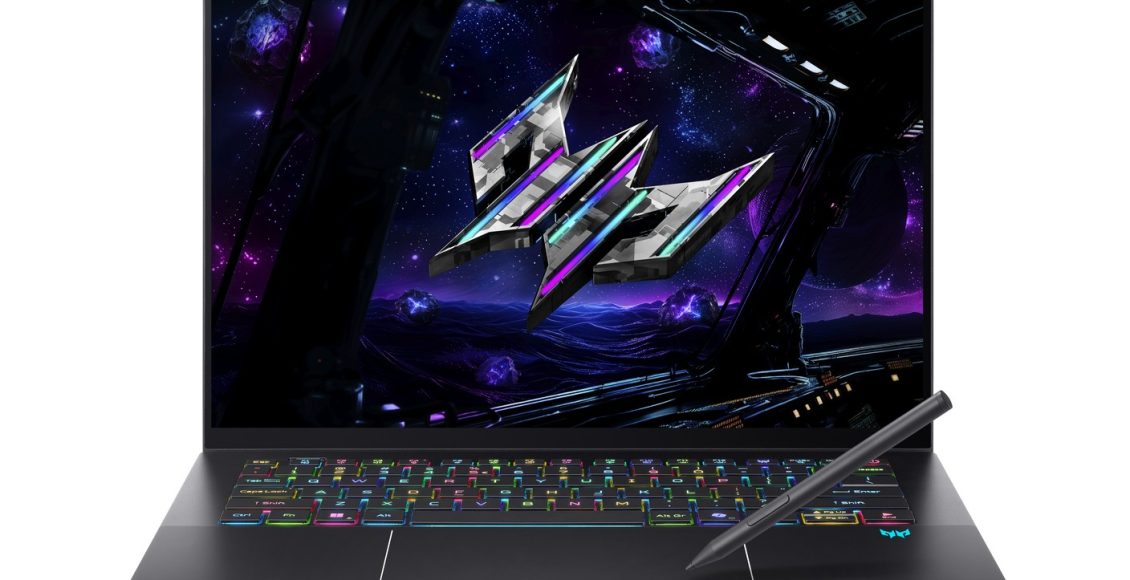
Long has been the days where gaming laptops are accented with gamer red, or even gamer cyan for Predator’s case here. The Predator Triton 14 AI looks unassuming, yet suave.
This has done for years now, but I love how Acer made the otherwise tacky-looking Predator logo to look elegant thanks to having a number of vertical lines light up, while the rest of the silhouette only visible in the right lighting. Other than that and the full-RGB situation the keyboard has, you couldn’t tell it’s a gaming laptop, which I assume what a person with a profession would’ve wanted.
While the Triton 14 AI’s top cover has anti-finger coating, that doesn’t mean your greasy hands won’t leave stains. But the smudges don’t look too bad and can easily wiped off.
There’s a crazy amount of engineering effort to make a laptop that has a GPU for gaming to be kept cool within a small chassis, but the mad lads at Acer has gone and done it. The air intakes are only at the bottom, but all of the heat is blasted through 18 slim slits that sits also at the bottom and front. There is a long, raised rubber padding that separates the bottom air-in intake and the bottom air-out vent.
You can barely see the exhaust, you wouldn’t even notice it unless you start looking and lifting the thing up to look at what’s underneath. All that while still looking as business sharp as a ThinkPad.
More on how the thermal performance later down the review, but for now, I just can’t help but be blown away by how slim and tight the packaging is while packing this much heat (in the sense that it has a powerful graphics chip, and literally speaking). I sure hope that rubber material can last through the years and resistant enough against heat, as that thing is literally the barrier between cool air in and hot air out.

The OLED screen is magnificent to behold. Bright, but not blinding as IPS displays can be at times. Colours pop, without feeling that a bright shining torchlight is being pointed to your eyes. Just the right amount of light is used to display everything on display. Incredible viewing angles, so even from viewed from the side you can see what’s on screen clearly. But it has some compromises.
The screen is a touchscreen, and so it has glossy, reflective glass instead of a matte finish and that means it’s easy to see yourself and whatever is behind you through the black mirror, even when it is not black. It does have anti-glare coating, but it only works if you view the screen in ideal conditions. More often than not I see the shining LED from the keyboards, or my own reflection, on a perfectly lit screen.
The 2880×1800 resolution of the screen, while impressive if you’re counting pixels, does mean you’ll need to turn down the resolution every time you boot a game as that’s way too big of a resolution to run games decently on.

While the screen is a touchscreen, it only detects fingers. The Triton 14 AI has this interesting addition where you can operate a stylus with, but Triton 14 AI isn’t an iPad. Rather it’s more of a Wacom drawing tablet, if you will. The stylus is only for use on the touchpad.
It’s unintuitive for the uninitiated, though I have no place to comment whether artists or other creative professionals are fine with this arrangement. But the one doodle I did on Ibis Paint shows the touchscreen can indeed detect different pressures, so you can gently sketch lines and then firmly press down with the stylus when you’re ready to commit.
You’ll have to figure out a way to carry and store the stylus on your own, though. The Triton 14 AI doesn’t have any way to attach or store the stylus, so it’s up to you to solve this potential problem.
Some Predator laptops still have all its I/O ports at the back, but the Triton 14 AI is more conventional with having the ports on the sides: Two USB-C 3.2 Type-A ports, Two USB-C 3.2 Type-C ports, and an HDMI port plus a MicroSD slot (handy if you take photos a lot, or have installed Steam games from a portable PC—not that you would run out of space with the huge SSD it comes with).
No dedicated proprietary power port, as the laptop is charged via USB-PD. The small brick rated at 110W can be plugged on either side through USB-C, which is nice.


At 1.6kg, the Triton 14 AI is a featherweight for a gaming laptop, something you can slip into your backpack and forget that you’re lugging a gaming beast around. It helps that the 14-inch form factor makes it relatively small. It’s smaller than an A3 paper, just about an A4 paper in area size but not quite.
It won’t attract too many unnecessary prying eyes should you bring it out at a coffee store, as long as you turn off those gamer RGB lighting and remember to turn off that loud startup sound effect. Maybe at your local tom yam restaurant they won’t mind some additional RGB lighting. But no, those colours on the trim at the hinges are not RGB, it’s just the metallic sheen which causes a prismatic lighting effect that just coincidentally looks like a gamer RGB.
Overall, The Predator Triton AI feels premium. It’s worth its price on the build quality. It’s a sleek, suave slate that has the right amount of heft and can easily be stored and bring about. The Triton won’t peeve any laptop owners who hate lugging their machines around.

Software
The software aspects of the Predator Triton 14 AI is awful, but that’s just the state of all Windows PCs these days, unfortunately. Windows 11 insists on making every device a personal one. It constantly syncing my OneDrive files into this loan unit (and when specified to be turned off and stop syncing, will just run again in the background without my consent). Edge regularly nudges you to use it instead of another internet browser. Pop-ups reminding the user this is a Copilot+ PC and what the power of AI can do. The usual Windows 11 bloat.
But Acer is not saint, either. The PredatorSense app which governs all the gaming-centric features is all fine, but there are so many extra stuff that’s on by default that if you didn’t pay attention when you set up the laptop, you’ll be up for a rude awakening down the line. Features like AI noise filtering is all good to have, but it’s on by default and you need to search around to find a toggle as it ruins the output of my condenser microphone that I’ve already set up to reduce noise. Then there’s the FOMO-inducing Dropbox offer of a free 100GB a year storage just to hook you into a subscription service. And McAffee.
You should spend a whole day to setup your Predator Triton 14 AI and see what all it has to offer, and scrub off the bloat to fit your purpose.
There is one neat feature on the software side in that the Triton 14 AI supports Nvidia Studio drivers as well as game drivers. For the professionals that do more work than game, they can have the latest drivers optimised for creative tools instead of gaming. You can download and install either kind of drivers at any time.
Plus, Microsoft is indeed making progress to get Windows 11 to work better for gamers. The Game Bar, when it runs reliably and not cause games to stutter, continues to receive UI design tweaks. Logging in using controller input, first seen on the ROG Xbox Ally and ROG Xbox Ally X, are now available on laptops, too. The Xbox app is slowly but surely becoming more usable. No Xbox Full Screen Experience (Xbox FSE) yet, though. But compared to the complaints I made about the state of Windows 11 and the Xbox app, Microsoft is taking the right steps, lethargically.


To demonstrate, the login process when playing a game that requires an Xbox login now can be done via a controller. Cool! Just hit A to proceed. But the next screen it’s the Microsoft login and it barely fits the window pane.
The software side of the Predator Triton 14 AI could be much better, but there’s not much innovation in this aspect, just expect more of the same of what Acer and Microsoft offers, for better or worse.


Gaming Performance
The Predator Triton 14 AI, released in October 2025 in Malaysia, packs one hell of a spec sheet. Acer spared no expenses. 2 whole terabytes of SSD storage, twice the expected storage. And 32 whole gigabytes of LPDDR5X RAM, which wasn’t a big deal when this launch, but now that a stick of 16GB RAM can cost 500 Ringgit a pop, that’s a massive flex.
The Intel Core Ultra chip is now one series behind with the launch of the Series 3 (Panther Lake), but the Intel Core Ultra 9 288V (Series 2, Lunar Lake) is the topline mobile processor Intel offered at the time of this laptop’s release. An Nvidia 5070 Laptop is the only compromise on this impressive spec sheet, an upper mid-range GPU that’s of course less power-hungry (and also less graphical power) to its desktop equivalent, but even then it’s more than average.
All of the specs add up to incredibly performant 1200p (1920×1200) gaming. That’s the closest resolution to 1080p for a 16:10 aspect ratio display, and I remain convinced that 1080p is good enough to game on these days. With the power within the Triton 14 AI, you can easily do 1200p gaming with any recent games right now.
All the games I’ve tested can breezely run at 60 FPS and more on high settings. This includes our reliable benchmark games including Forza Horizon 5, Cyberpunk 2077, Hitman 3 and Ratchet & Clank: A Rift Apart. All these games can run perfectly fine above 60 FPS at 1200p through raw, rasterized frames rendering alone. Nvidia DLSS upscaling and frame generation are available on the Triton 14 AI, but even if you opt to not mess around with them, the games I’ve tried it with can run them all well.
The open world portions of Street Fighter 6’s World Tour mode, a usual performance issue on lesser equipped PCs, runs buttery smooth at 60 FPS.
The most recent title we tested, 2024’s Star Wars Outlaws, run decent too, maintaining 60 FPS most of the time on High at 1200p. (the game for some reason drops to 30 FPS when sitting, leaning or using the binoculars but this is a game issue rather than the laptop). The current Early Access version of Assetto Corsa Evo can handle 30-car racing in the rain at 30 FPS with settings cranked to high, though it struggles on big tracks, namely the Nurburgring in its massive 24hr layout (again, likely a game issue).

The most incredible feat the Triton 14 AI can do is keeping things cool. Acer sure likes to boast about its proprietary AeroBlade 3D fans, now in its 6th generation, and do have every right to flex it.
Over long periods of gaming (3-5 hour gaming sessions) the Acer Triton 14 AI operates at a constant temperature. Internal temperature reports say it’s running at about 86 degrees Celcius—that’s the standard temperature when GPUs are on full load. But more importantly, it can keep its cool in the sessions I’ve played.
The keyboard area where the two fans sit below feel ridiculously cool to touch, temperature-wise. It’s so cool that I feel like cold air is blowing through the keyboard keys. It’s not, but that’s the sensation it gives.
The temperature difference between the area directly being blown by the fan and not is insane. Your fingertips will not be singed by the heat in any way while touching the WASD keys.
However, your palms probably will feel toasty.
As amazing as the fans are doing its job to keep the Triton cool, there’s more work to be done to ensure all the heat is dissipated through the exhaust and not backed up to the opposite side of the laptop with no ventilation. The edge closest to you when the laptop sits in front, the part where you palm rests when typing, is noticeably warm, moreso on the lower-right side. Even the touchpad gets a bit warm.
Any gamer with elite ball knowledge knows to game on a gaming laptop one would better off have an external keyboard or a controller. But this issue is something the brilliant engineers at Acer can think of solving next—how to ensure only the exhaust side of the laptop is warm while all user-facing sides remain cool and safe to touch during heavy loads.
At least your mouse-wielding arm won’t feel the heat, no vents on the sides.
Also, it doesn’t take long after closing a game before all the heat gets dissipated and the laptop runs at the regular operating temperature of about 44 degrees Celsius.
Between the performant AeroBlade 3D fans, the use of graphene TIM in place of regular thermal grease (the first laptop in the world to do this, Acer claims), I feel safe knowing that the Triton 14 AI won’t be overheated and cause irreparable damage to the chips anytime soon.
Unlike another laptop I tested previously, the cooling performance here feels more than adequate and more importantly, gives me that peace of mind that I can be comfortable pushing it to max performance over long periods. That’s an important thing for gaming laptops since these chips are soldered onto the motherboard and they’re not cheap to replace, let alone available to be replaced.
There’s also the acoustics of the fans. At 1000-2000 RPM the whizzing of the fans are gentle and mostly go unnoticed, but on full load it will spin at about 5000 RPM and you’ll hear it revving out loud with no breaks. Not as loud as a portable vacuum cleaner, but loud enough for one to notice like how a base PS4 can sound on full load.
The laptop’s speakers at 100% volume isn’t enough to drown out the fan sounds. In fact, even the sound quality is beaten by a 10-year old Windows 7 laptop. And not just the loudness, the sound quality is a bit off, a bit nasally with no bass. Get yourself a pair of headphones (a wired one will work, it has a 3.5mm jack) or earbuds if you game on this when it’s cranked up to Performance or Turbo mode. At Balanced power, it’s perfectly fine.
The Predator Triton 14 AI excels at gaming, despite its slim-and-thin nature. Its cooling prowess is astonishing, though with rooms to improve further. Obviously we don’t know whether the laptop can still keep its cool in the long run, but at peak performance, the Triton 14 AI can run games without breaking a sweat, and without making you sweat.

Value
With the price of an Acer Predator Triton 14 AI starting at RM12,999, that’s an instant nope to a good 90% or so of potential laptop owners out there. By the time you save up RM1,000 a year from your salary (and that’s a big ask to save at least half of your monthly earnings), a new model will replace this 2025 version by the time you have enough to afford one.
It’s definitely for those who have big wallets, but who does, especially in this economy?
The one big argument against buying a gaming laptop is that a desktop PC build with the same specs is undoubtedly much cheaper. But the current going-ons of the PC market (largely thanks to the much hyped-up AI bubble) has made PC part costs going up at an insanely rapid rate. Heck, even this generation’s gaming consoles are continuing to go up instead of going down over the years. It’s an awful time to be a gamer or a PC enthusiast.
As such, the Triton 14 AI, somehow, is justifying its price, even moreso, due to these outside factors. But not by much. RM13K is still a lot of money for a product that’s going to be outshone in months (it already is, Intel just revealed its next generation of CPUs). And that’s RM3K more than MSRP of the outgoing Triton model this one is replacing, the 2024 Predator Triton 16 Neo.
But what you get here is a magnificent package that can fit a beautiful screen, great gaming specs, all the RAM and SSD storage you need and stylus support, all within a 14-inch form factor. That’s a lot in a slate so little in size. Unfortunately, it’s out of reach for most folks.
Verdict
The Acer Predator Triton 14 AI is an amazing display of prowess. The pleasing OLED display, capable gaming performance and sleek form factor are already good selling points. Its outstanding cooling performance is amazing to behold, even if it’s not truly perfect yet.
The high asking price makes the Predator Triton 14 AI not for everyone, but to the gaming professional that can afford it, you’d better consider this as one of the more attractive options for your work and play station.
For everyone else, the Triton 14 AI is proof Acer can make suave slates when money is no object, such quality one would hope trickles down to their more affordable offerings.
Review unit loaned courtesy of Acer Malaysia.
Acer Predator Triton 14 AI (2025)
The high asking price makes the Predator Triton 14 AI not for everyone, but to the gaming professional that can afford it, you'd better consider this as one of the more attractive options for your work and play station.
- Hardware 9
- Software 7.5
- Gaming Performance 9
- Value 7